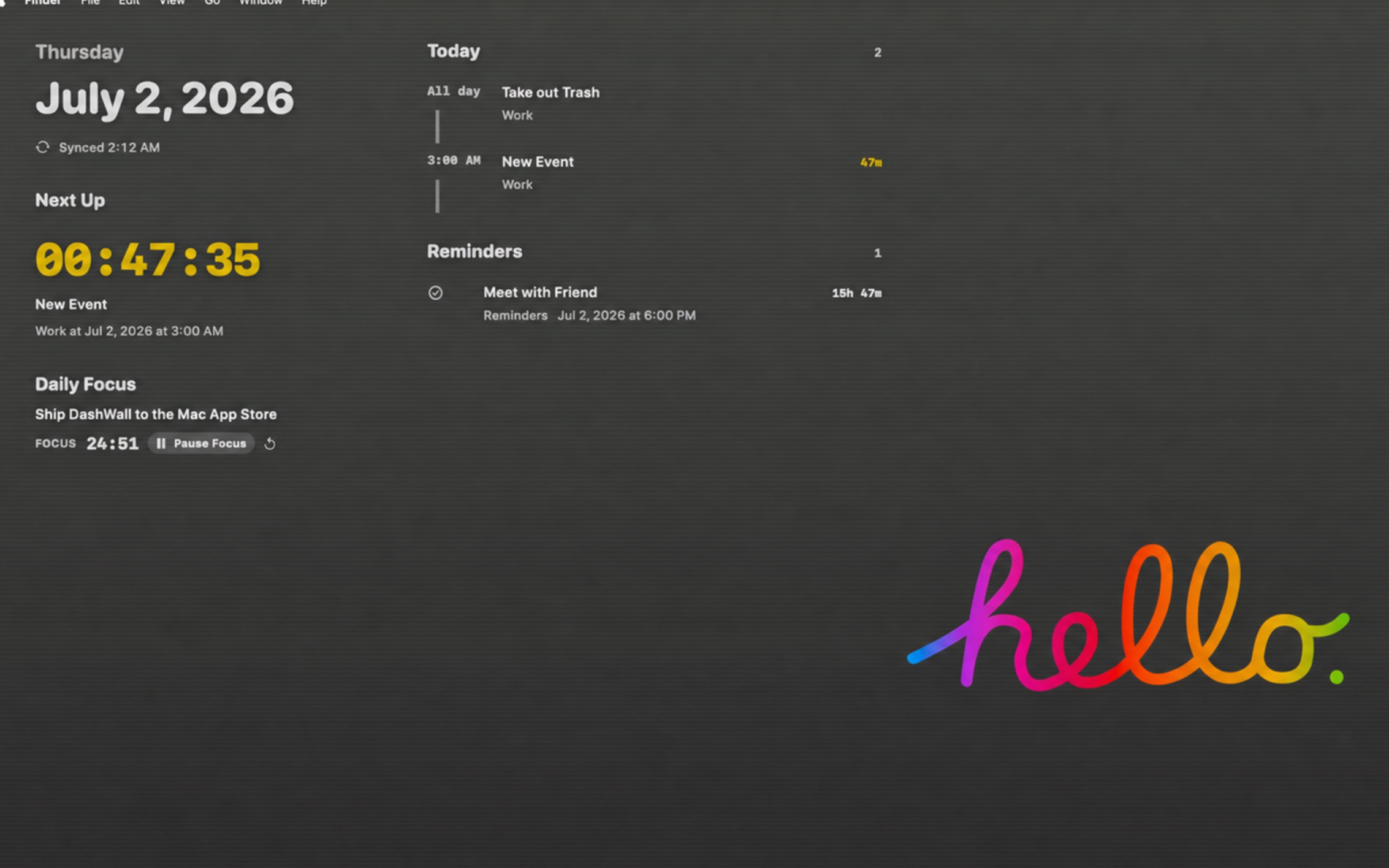
Ambient productivity for macOS
Your day,
quietly visible.
DashWall turns the desktop you already have into the calm command center you keep opening apps to find.
Direct-download edition · 7-day trial · $4.99 lifetime launch offer
Calendar·Reminders·Daily Focus·Scenes·Pomodoro·
Calendar·Reminders·Daily Focus·Scenes·Pomodoro·
01 / The idea
Stop opening Calendar
to answer a three-second question.
What is next? What needs doing? What am I focusing on? DashWall keeps the answers in the quietest place on your Mac: the desktop behind your work.
02 / What it does
Everything useful.
Nothing demanding.
01
Today, without the detour.
A live timeline brings together all-day plans, timed events, meeting links, and the countdown to whatever matters next.
Design reviewStudio
Launch check-inStarts in 24m
Deep workFocus block
GymPersonal
02
Focus that survives real life.
Start a session from the desktop. Pause it, close the app, put the Mac to sleep. Your timer knows where you left off.
FOCUS24:51
03
Readable on every wallpaper.
Adaptive contrast analyses the wallpaper locally, then chooses light or dark type with soft, layered legibility.
LightDarkAa
04
Your desktop. Your data.
Calendar, Reminders, focus history, and wallpaper analysis stay on this Mac. No ad SDK. No data broker. No cloud account required.
100%Local-first
03 / Scenes
One desktop.
Five states of mind.
Switch the information, density, and privacy level to match the moment.
01Minimal
Date · Clock · Next event
Developer
Timeline · Focus · Reminders
Planning
Daily Brief · Tasks · Focus goal
Evening
Tomorrow · Progress · Quiet mode
Presentation
Clock only · Privacy enabled
04 / Native by design
Built for macOS.
Not merely running on it.
EventKitCalendar and Reminders through Apple's permission system.
Native
Desktop layerSits behind normal windows and stays click-through when locked.
Calm
Multi-displayMain display, a chosen screen, or every connected display.
Flexible
AccessibilityKeyboard controls, privacy modes, and reduced-motion support.
Considered
Launch offer
Pay once.
Keep the calm.
Try the complete desktop experience for seven days. If DashWall earns its place, keep it for one small lifetime price.
DashWall lifetimemacOS 14+
$4.99
One-time payment · No subscription
- Calendar and Reminders dashboard
- Persistent focus sessions
- Five desktop scenes
- Adaptive wallpaper contrast
- Multi-display support
Start the 7-day trial →
Direct-download edition. Secure checkout and download via Gumroad.
05 / Questions
Before it lives
on your desktop.
Does DashWall replace my wallpaper?+
No. It adds a transparent dashboard layer above your wallpaper and behind normal app windows. Your existing wallpaper stays exactly where it is.
Will it block my desktop icons?+
No. Locked Mode ignores mouse input so files and icons remain usable. Hold Option or choose Edit Desktop when you want to interact with DashWall.
Is my calendar uploaded?+
No. Calendar, Reminders, focus data, and wallpaper analysis are processed locally on your Mac.
Can I use it on an external monitor?+
Yes. DashWall can appear on the main display, one selected display, or all connected displays.
What happens after seven days?+
The dashboard shows a simple upgrade screen. Lifetime access is currently $4.99 with no recurring subscription.